Signal Work Management
Inbound triage · AI-assisted · workspace scoping · urgency-led feed
Work doesn't arrive in a queue. It arrives in fragments—a Slack message here, an email thread there, a calendar hold that needs a decision, a form submission nobody's claimed yet. Signal is the surface that makes that inbound legible: urgency-grouped, workspace-scoped, and built for the person everything flows through. A Claude-powered Triage Assist reads each signal in full and returns a recommended urgency, owner, and first action.
Context
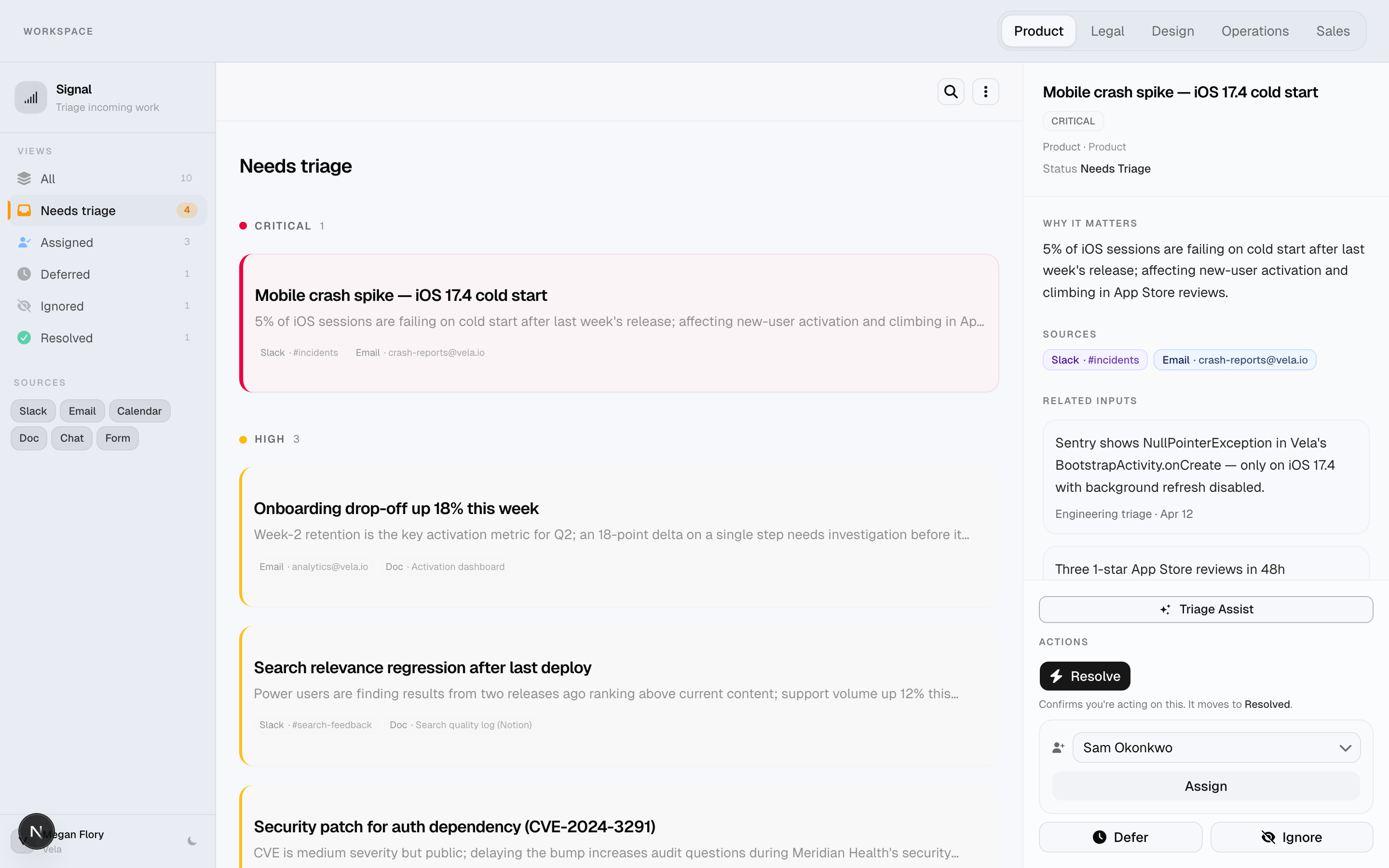
Every growing team has a person who is everyone's first stop—not because they're the most senior, but because they're the most connected. The PM whose DMs are half other people's blockers. The ops lead who routes everything before it has a real owner. The team lead who has 40 unread messages at 9 a.m., knows maybe six of them need action today, and can't find the six without reading all 40. They're not behind because they're slow. They're behind because the work is invisible.
The problem isn't volume. It's legibility. A critical customer escalation and a low-priority docs request look identical in an email inbox. The thing that's been waiting a week looks the same as the thing that just came in. You feel behind but you don't know what you're actually behind on—because the work isn't visible as a coherent stack. It's scattered across six channels, with no shared sense of urgency, ownership, or record of what's already been decided.
Signal is the surface that makes the inbound stack visible. It collapses work from Slack, email, calendar, docs, forms, and chat into a single feed—scoped by team workspace, grouped by urgency, and triaged item by item. When you need a second opinion on how to act, Triage Assist sends the full signal context to Claude and comes back with a structured recommendation.
The problem
Teams managing multi-channel inbound typically hit the same set of structural problems:
- Everything looks equally loud — a critical enterprise renewal and a low-priority docs request compete for the same attention in an undifferentiated inbox. The urgent item doesn't announce itself.
- Source context gets lost in handoffs — knowing that a request came from a Slack DM versus a formal email versus a calendar hold matters for how you respond and who should own it. That context evaporates by the second forward.
- Triage happens mentally, not visibly — most teams triage in their heads, continuously, as new messages arrive. There's no record of "we decided to defer this" or "this is assigned to Jordan"—just an unspoken understanding that degrades over time.
- Cross-team work collides — legal requests, product decisions, design reviews, and ops tasks don't belong in the same undifferentiated list. Mixing them creates noise for everyone.
- Mistakes are hard to reverse — marking something as ignored or resolved is a lightweight action in practice, but it needs a recovery path. Triage actions that can't be undone create hesitation.
Design approach
Three decisions anchored the design before any screens were drawn:
Urgency as structure, not label
Most tools badge items with an urgency color and leave sorting to the user. That still requires mental re-sorting under pressure. Signal groups the feed by urgency so the scan pattern does the work: top of the list is always critical, regardless of when things arrived. The visual hierarchy isn't decoration—it encodes the decision about what to look at first. A flat list with urgency badges still asks something of the user. A grouped feed doesn't.
AI that earns trust through restraint
Triage Assist doesn't auto-commit anything, and that was a deliberate design choice—not a technical limitation. Triage involves judgment Claude doesn't have: team capacity, relationship context, the unspoken prioritization that lives in someone's head. What Claude cando is give you a structured starting point so you're not cold-starting a decision from scratch. The recommendation is advisory. You review it, adjust if needed, and commit. Keeping the human in the loop isn't a hedge—it's the right design for this kind of call.
Triage states that capture decisions, not just status
The five states—Needs Triage, Assigned, Deferred, Ignored, Resolved—model what you chose, not what's technically pending. "Ignored" means the team consciously passed on it. "Deferred" means they know about it and decided to wait. That distinction matters: it separates a signal that fell through the cracks from one the team intentionally deprioritized, and the record of that choice is as valuable as the action itself.
What I built
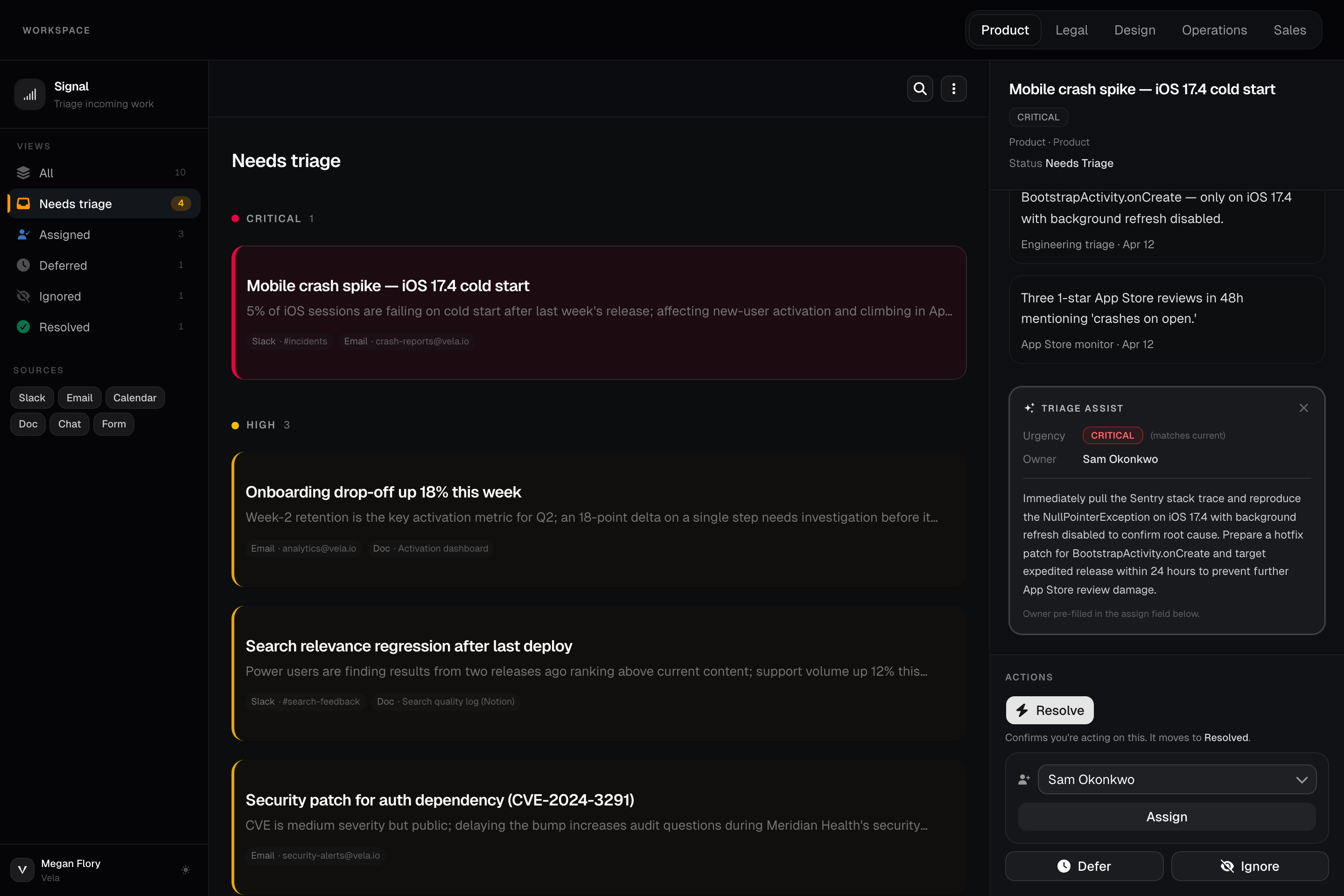
- Triage Assist — Claude API — a sparkle button in the detail panel sends the full signal context (title, urgency, workspace, why it matters, sources, related inputs) to Claude. It returns a structured recommendation: suggested urgency, recommended owner, and a 2-sentence action plan. The suggested owner pre-fills the assign dropdown so one click commits it. The result is advisory—you review and decide.
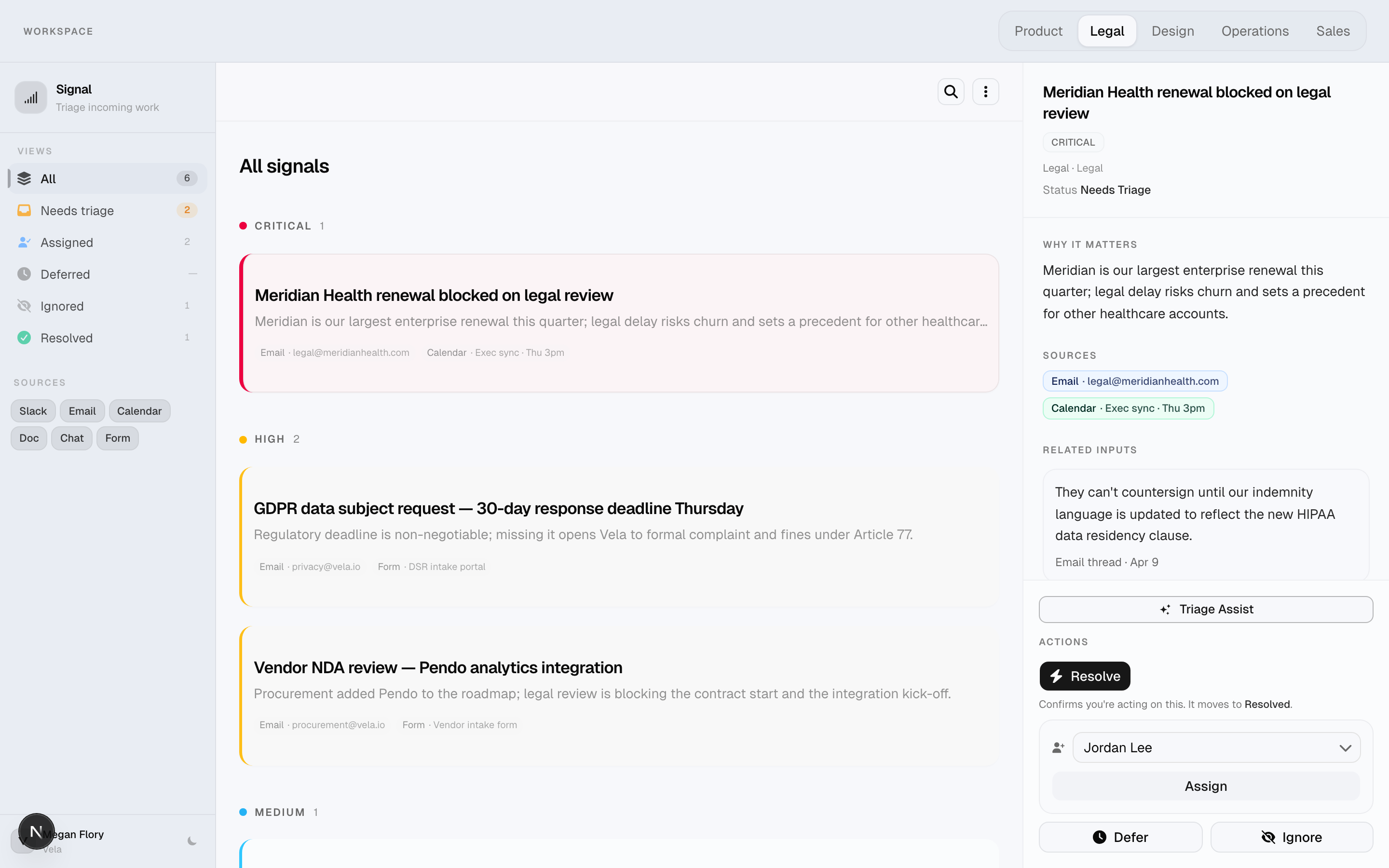
- Workspace scoping — five team workspaces (Product, Legal, Design, Operations, Sales) scope the feed so different teams don't compete in the same view. Switching workspaces is a single click; the feed, filters, and empty states all update to match the new scope.
- Urgency-grouped feed — signals are grouped by urgency (Critical → High → Medium → Low) so the stack sorts itself. You don't have to mentally re-sort a flat list. The critical items are at the top by definition.
- Triage state lifecycle — every signal moves through states: Needs Triage → Assigned, Deferred, Ignored, or Resolved. The triage view filters the feed to exactly one state at a time. "Needs Triage" is the default—the unprocessed inbound.
- Source filters — signals carry the channel they arrived from (Slack, email, calendar, doc, chat, form). The sidebar lets you toggle sources on or off so you can focus on a specific channel or silence the ones you're not managing right now.
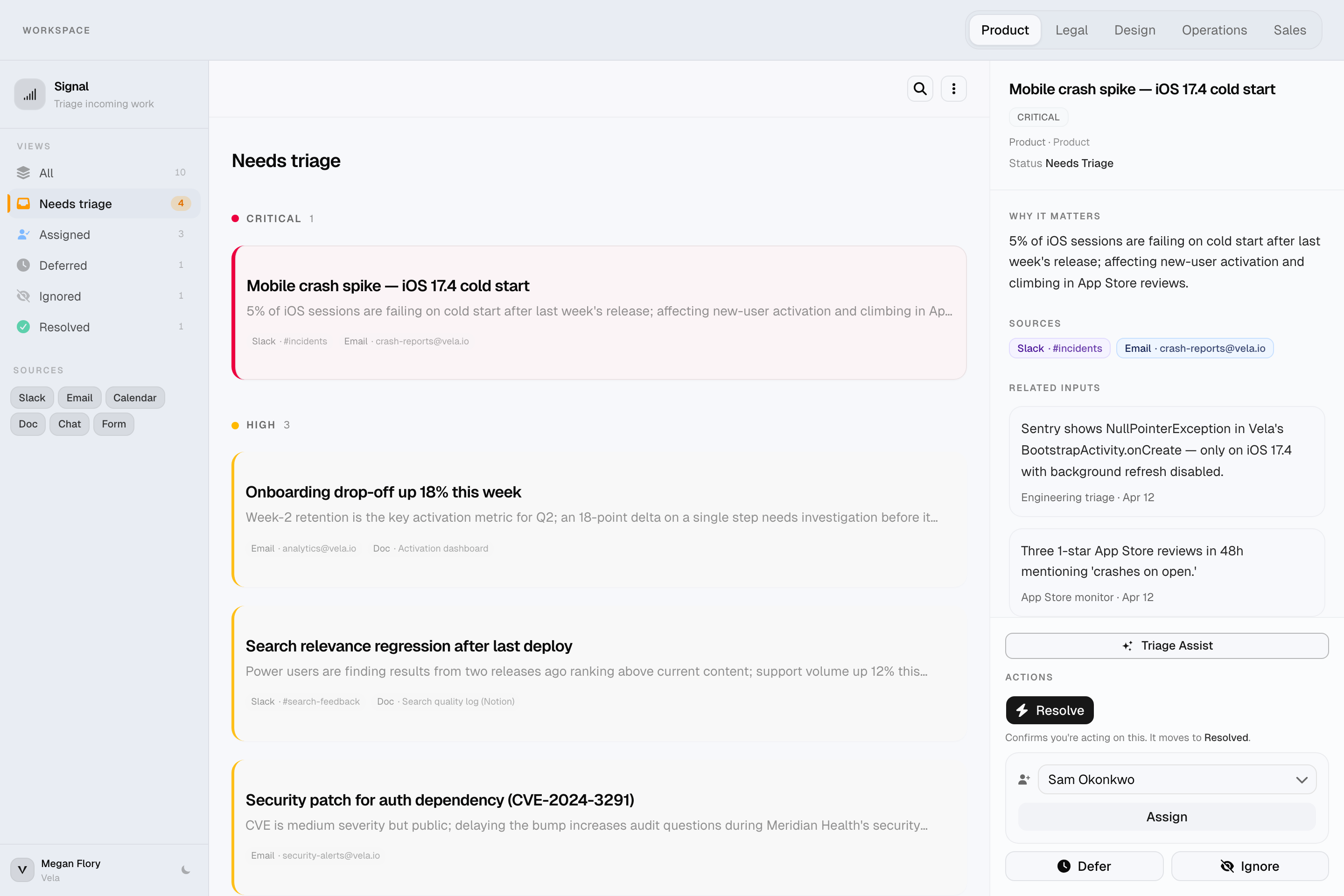
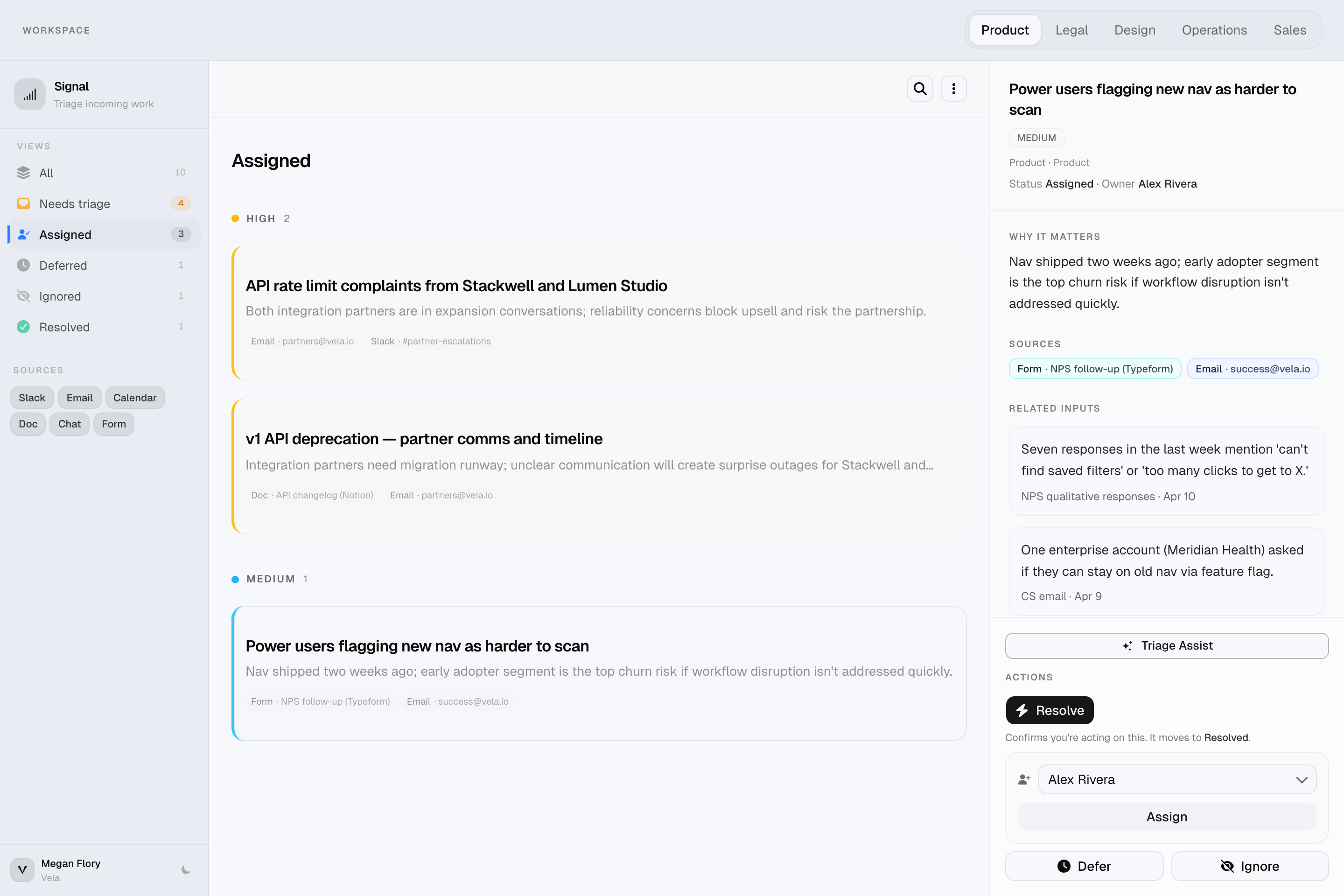
- Detail panel — selecting a signal opens a focused panel showing the full context: why it matters, related inputs (the actual message snippets and their sources), assignee, and triage actions. The feed stays visible alongside it.
- Dark mode — system-aware dark mode with localStorage persistence and an anti-flash inline script in the document head. Toggled from the user bar in the sidebar.
- Undo via Cmd+Z — triage actions (ignore, defer, resolve, return to triage) are reversible. Cmd+Z restores the previous state without a confirm dialog. One level of undo; fast and honest about its limits.
- Import / export — the workspace can be exported as JSON and re-imported to restore a session. The import validates schema shape before overwriting anything.
- Local persistence with seed reset — state persists to localStorage between sessions. A reset button restores the original seed data, useful for demos and for recovering from a completely triaged queue.
Key features
Urgency-grouped feed
The feed doesn't sort by arrival time — it sorts by what matters. Critical signals are always at the top, not buried three screens down because they came in on a Tuesday. In the Legal workspace, that means the Meridian Health renewal blocking on legal review is the first thing you see — not the blog footer disclaimer that can wait a week. The workspace bar scopes everything: one click moves you from Legal's queue to Product's to Operations', each with its own signals, counts, and active triage state.
Detail panel
Selecting a signal doesn't take you anywhere — the feed stays visible and the detail panel opens alongside it. What's in there: a why it matters sentence (the business consequence if this goes unhandled), source chips linking back to the original messages, and related input snippets with timestamps. For the Q2 vendor access review, that means seeing the security checklist note about two former contractors still on vendor portals — context that would otherwise take five minutes to reconstruct from Slack history. Triage actions and the Triage Assist button are at the bottom.
Triage Assist
One button sends the full signal context to Claude — title, urgency, workspace, why it matters, every source, every related snippet — and gets back a structured recommendation in under two seconds. Not a summary. An opinion: suggested urgency (with a note if it matches what's already set), recommended owner from the team roster, and a specific 2-sentence action plan. For the iOS crash spike, that looked like: pull the Sentry logs for the NullPointerException in BootstrapActivity.onCreate, determine if a hotfix can ship in 24 hours, post an ETA to #incidents. The suggested owner pre-fills the assign dropdown. You review, adjust if needed, and commit. The decision is still yours.
Triage states
Every signal moves through five states: Needs Triage, Assigned, Deferred, Ignored, Resolved. These aren't task statuses — they're decisions. A signal marked Assigned means someone owns it; the record shows who and when. Deferred means the team consciously parked it, not that it fell through the cracks. The sidebar view counts update in real time so you always know what's unprocessed. If you misfire, Cmd+Z reverses the last action without a confirm dialog.
Stack
- Next.js 16 (App Router) — client workspace component manages all signal state; the page shell is server-rendered for fast initial load. API routes handle the Claude integration server-side so the key never touches the client.
- Claude API (Anthropic) — Triage Assist calls
claude-haiku-4-5via a Next.js API route. The system prompt defines the team roster and their roles; Claude returns a typed JSON object (urgency, suggested_owner, recommended_action) that maps directly onto the UI. - Tailwind CSS — utility-first styling with a three-level surface hierarchy (sidebar, background, card) defined in OKLCH color tokens. Full dark mode via
.darkclass on<html>with localStorage persistence. - TypeScript — strict types throughout; domain types (
Urgency,TriageState,SourceType,Workspace) flow from a singletypes.ts. Runtime type guards on import validation and Claude response parsing prevent corrupt data from silently coercing into the wrong shape. - localStorage persistence — signals persist between sessions with schema versioning (
signal-signals-v5). The service layer handles hydration, patching, and reset to seed without the signals array ever touching the component directly. - Seed data — 30 signals across all five workspaces built around Vela, a fictional B2B SaaS company. Signals span enterprise renewals blocked on legal review (Meridian Health), mobile crash spikes, onboarding drop-offs, vendor NDAs, and API partner escalations. Mixed triage states and urgency levels so every view has something to show.
Design decisions
Triage Assist is advisory, not automatic
The AI suggestion doesn't auto-commit anything. It shows a recommended urgency, pre-fills the owner dropdown, and gives you a two-sentence action plan—but you review it and decide. This was a deliberate choice: triage involves judgment calls that depend on context Claude doesn't have (team capacity, politics, relationships). Showing the reasoning and letting you accept or override it keeps the human in the loop while still reducing the cognitive load of cold-starting a decision.
The why_it_matters field
Every signal carries a why_it_mattersstring — a short sentence explaining the business consequence if this item isn't handled. This turned out to be the most important field in the data model. Without it, signals read as task titles. With it, they carry their own context. You don't have to reconstruct the stakes from the title — the card tells you: "Meridian Health's renewal is the largest in the quarter; legal delay risks churn." That changes how you prioritize. It also gives Claude richer input for Triage Assist recommendations.
Urgency as structure, not decoration
Urgency grouping is structural, not visual. The feed doesn't just badge items with a color — it groups them so the scan pattern matches how people actually read under pressure: top to bottom, most critical first. A flat list with urgency badges still requires mental sorting. A grouped feed doesn't.
Triage states over task status
The five triage states (Needs Triage, Assigned, Deferred, Ignored, Resolved) model decisions, not progress. Something "ignored" isn't broken — it's a conscious choice that the team has logged. "Deferred" isn't stalled — it's explicitly parked. This matters because it separates the signal from the response: you can triage without acting, and the record of what you chose is as valuable as the action itself.
Workspace-first scoping
The workspace switcher is the first thing you hit because the wrong scope makes everything else useless. Legal work and product work compete in the same list only if you let them. Scoping by team first — then filtering by urgency and source — means the feed is always answering a specific question: what does this team need to handle right now?
Sources as a filter mode, not metadata
Source type (Slack, email, calendar, doc, form) is filterable because different sources imply different response modes. When you're clearing your email backlog, form submissions are noise. When you're preparing for a meeting, calendar items deserve their own focus. Sources aren't just labels — they're a way to enter a different mode of work on the same queue.
What changed when it got real
- Empty states had to explain the lens. An empty feed without context looks broken. Once workspace, triage view, source filters, and search could all combine to produce zero results, the empty state needed to tell you why: "No critical signals need triage in the Product workspace." Without that specificity, users would assume the app had failed, not that they'd triaged everything.
- Undo became essential once actions felt real. Early versions had no undo. Marking something as "ignored" felt risky — what if you mis-clicked? Adding Cmd+Z reduced hesitation on every triage action. One level is enough: you almost never need to undo two steps back, but you frequently need to undo the last one.
- The mobile sheet needed its own design. On desktop, the detail panel sits alongside the feed. On mobile, it opens as a full-height sheet — which created a problem: the sheet felt like it replaced the context you were just in rather than extending it. The fix was visual: the sheet slides up rather than replacing, and the close button returns you to exactly where you were in the feed.
- Visual hierarchy beat extra chrome. Early card designs had urgency color blocks, source icons, and badges competing for attention. Stripping back to a quiet card with strong typographic hierarchy let the
why_it_matterstext carry the weight. The data is the design — decoration was getting in its way. - Schema validation on import caught silent failures. The first version of import just parsed JSON and loaded it. A malformed file would partially load or silently coerce wrong types into the state. Adding schema validation before any state mutation meant the worst case was a clear error message, not corrupted data with confusing behavior downstream.
- Claude for Desktop hijacked the API key. Claude for Desktop injects
ANTHROPIC_API_KEYas an empty string into every shell it spawns, which silently overrides.env.localvalues. The fix was renaming the variable toSIGNAL_ANTHROPIC_KEYto avoid the collision — a good reminder that environment variable naming is part of the integration surface.
Outcome
- Signal is a complete, interactive triage tool — not a concept. Every feature is wired: workspace scoping narrows the feed, triage actions update state and persist, undo works, import validates before loading, and the empty states explain exactly what lens produced them.
- The Claude integration shows where AI earns its place in a workflow tool: not replacing the decision, but reducing the cold-start cost of making it. Triage Assist reads the same context a human would—title, stakes, sources, related snippets—and returns a structured first opinion. You stay in control; it just gets you to a starting point faster.
- The design question Signal is answering is real: how do you make multi-channel inbound legible without flattening it into a generic task list? The answer is structural — urgency as the primary sort axis, workspace as the scope, triage state as the decision record, and source as the filter mode. None of those are decorative additions; each one does load-bearing work.
- Code lives here: github.com/meganleclair/signal-work-management.