Threshold
Cyber insurance operations · underwriting workflow & decision tracking
When a cyber event crosses a risk threshold, it enters the queue. Threshold is the operational layer between something happening and a coverage decision being made—tracking ransomware assessments, breach evaluations, and sublimit reviews with clear ownership and a full audit trail.
Context
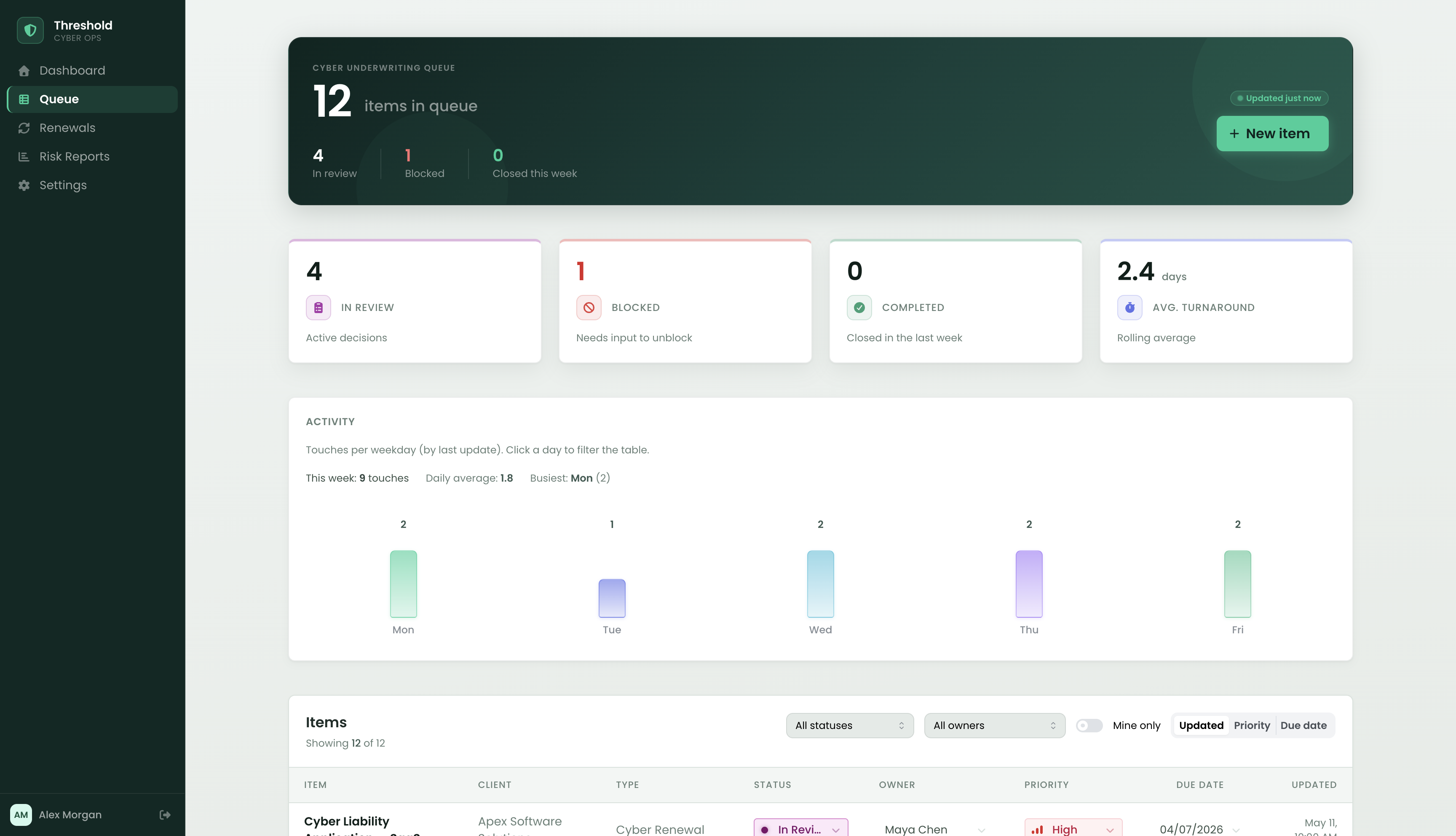
Cyber insurance underwriting teams move high-stakes work through defined review stages—ransomware assessments, data breach evaluations, sublimit endorsements, and annual renewals. Each item has an owner, a regulatory deadline, and a chain of decisions that need to be auditable. A blocked sublimit endorsement can stall a policy bind. A missed HIPAA breach notification window can create coverage disputes that outlast the original incident.
The name comes from the domain: when exposure crosses a risk threshold, the underwriting team has to act. Threshold is the surface that shows them what crossed, who owns it, where it's stuck, and what decisions have been made—without the overhead of a general project management tool that wasn't built for this kind of work.
The problem
Cyber insurance ops teams typically track work across email threads, shared spreadsheets, and ticketing systems built for engineering, not underwriting. The result is predictable: ownership drifts, status goes stale, and decisions made in a quick call disappear before the next renewal cycle.
- Blocked items are invisible — a sublimit review waiting on network architecture docs looks identical to one actively in underwriting.
- Activity history doesn't exist — who approved the BEC sublimit adjustment and why isn't captured anywhere auditable. That decision matters at renewal.
- Prioritization is manual — figuring out what's due this week requires sorting a spreadsheet, not scanning a live queue with regulatory deadlines visible.
- Generic tools don't fit the shape of the work — Kanban boards don't support dense item lists with sublimit thresholds; project tools add overhead the team doesn't need and don't speak the domain's language.
What I built
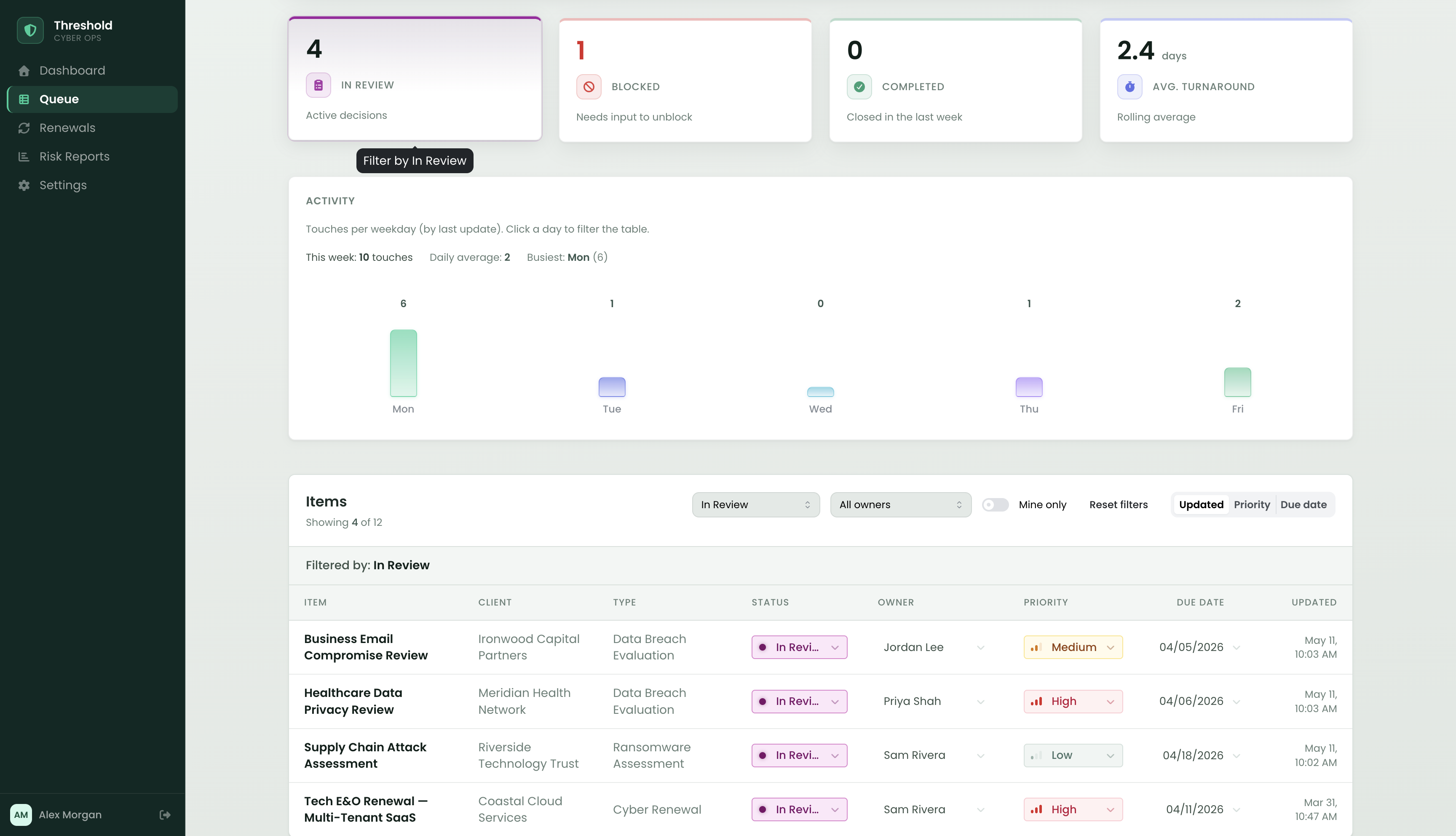
- Dashboard with live metrics — four stat cards at the top of the queue: In Review, Blocked, Completed this week, and avg. turnaround. Clicking In Review or Blocked filters the table instantly, so the metric is also a shortcut into the relevant slice of the queue.
- Activity bar chart — a Mon–Fri chart shows how many items were touched each weekday. Clicking a bar filters the table to that day's work. Hovering shows a per-status breakdown for each column. It makes weekly cadence visible without a reporting tool.
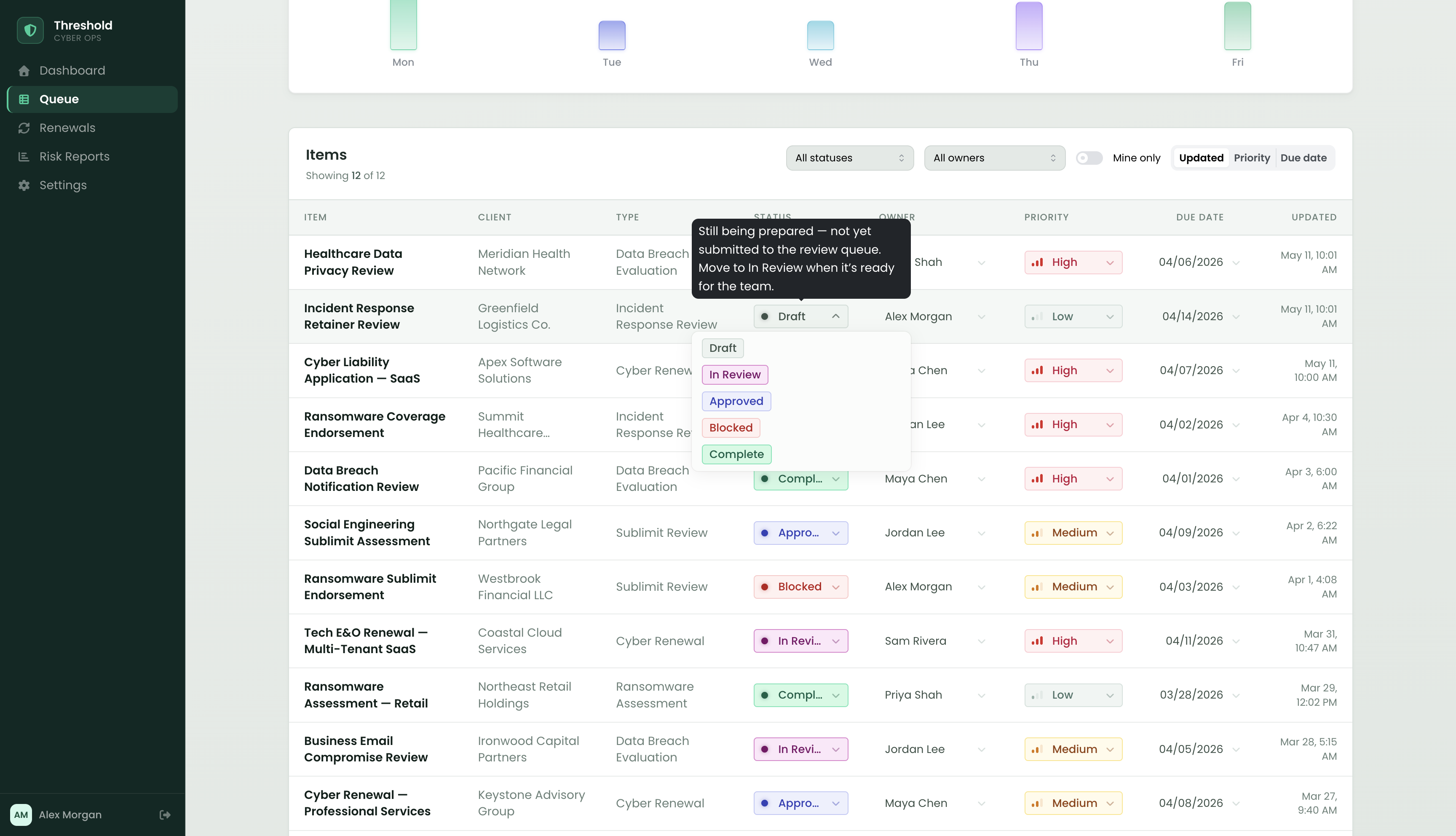
- Inline editing — status, owner, priority, and due date all update directly in the table row. No modal, no navigation, no lost scroll position. Updates write to the item's activity log immediately.
- Composable filters — status, owner, and "mine only" dropdowns work together with header search and activity chart clicks. A unified filter banner shows exactly what's active and clears in one click.
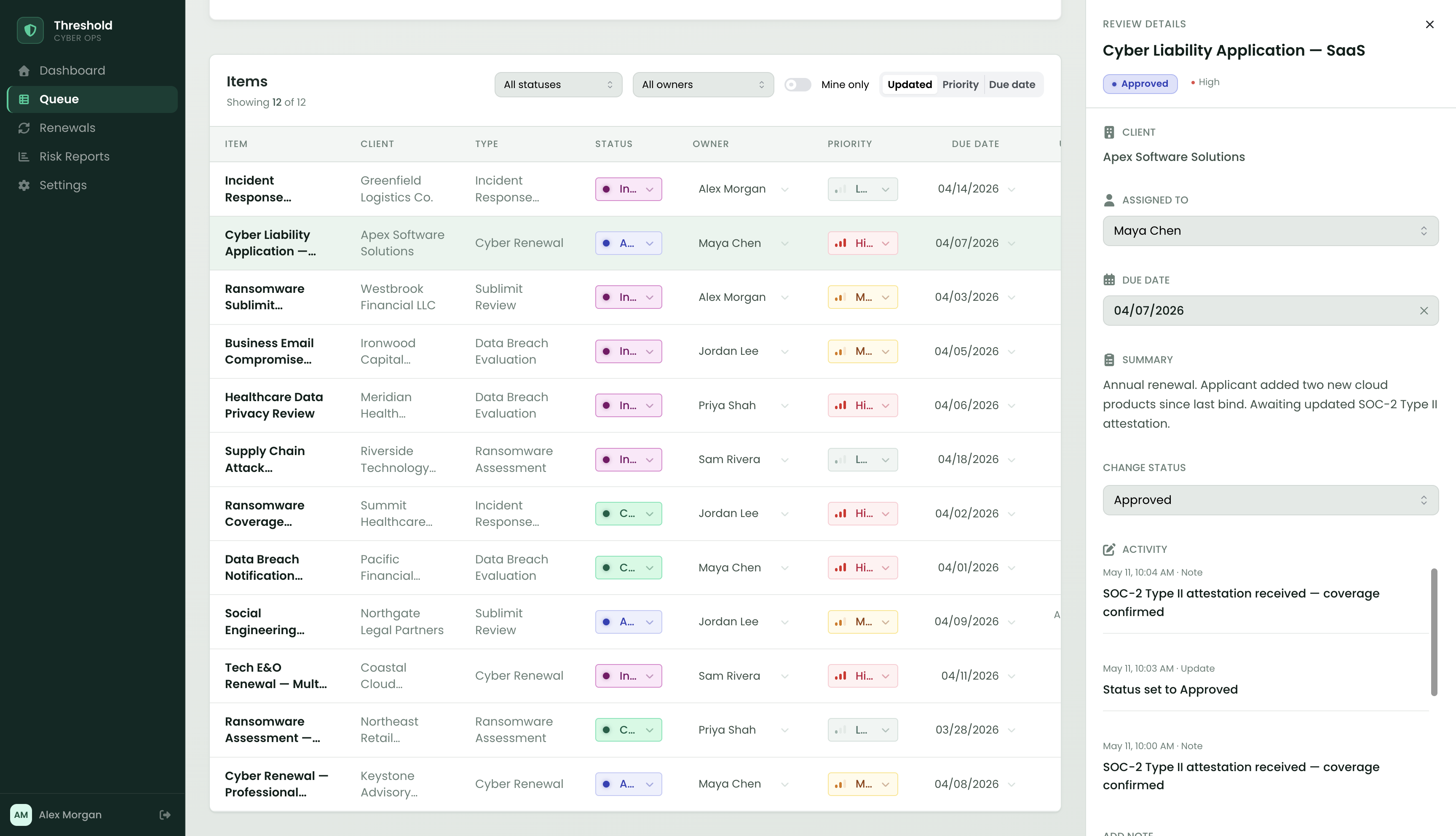
- Detail panel — selecting a row opens a sticky side panel without replacing the main view. It shows the item summary, metadata, editable fields, and the full activity log. Notes can be added directly—everything that would otherwise live in a Slack thread or an email chain.
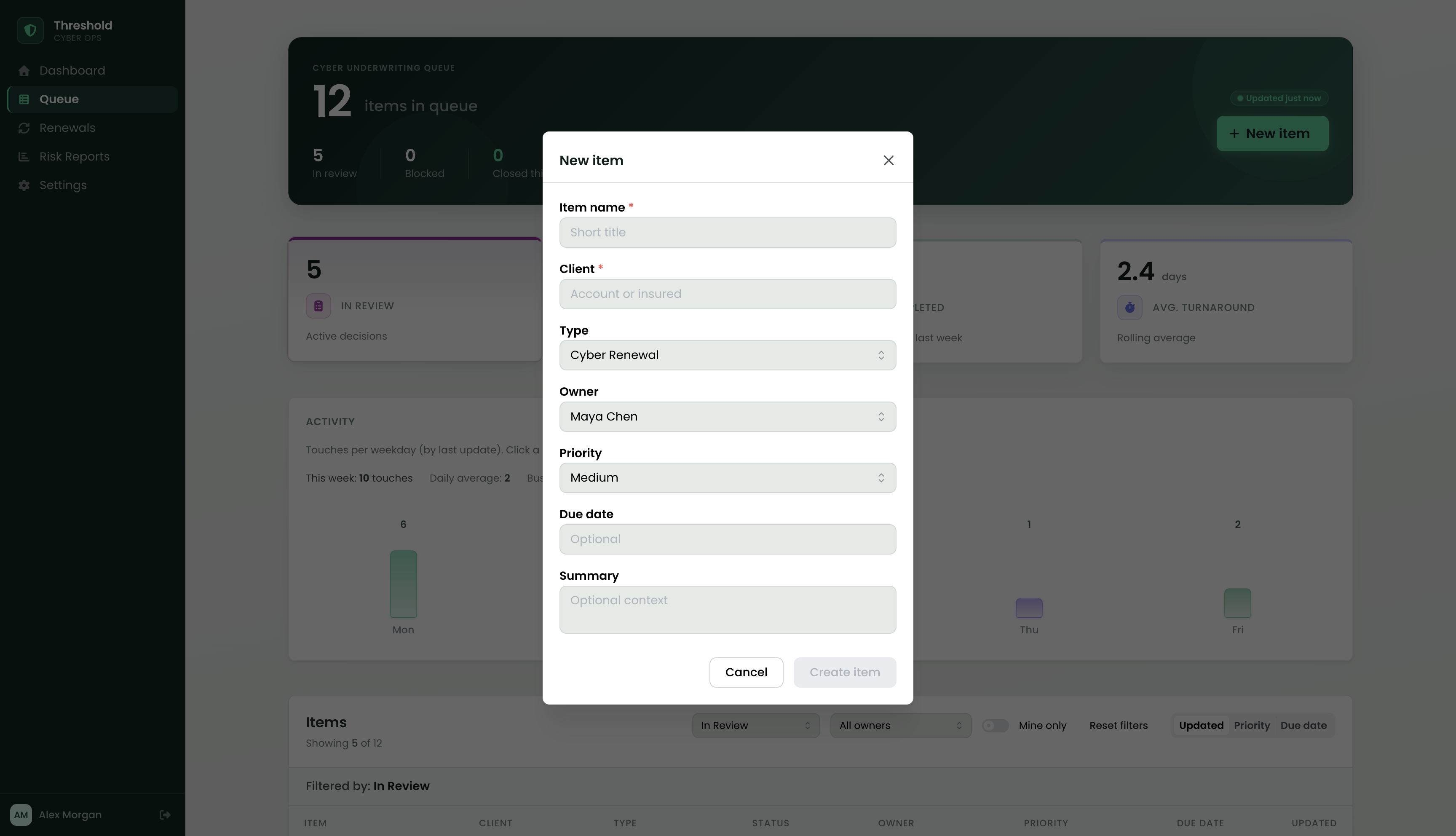
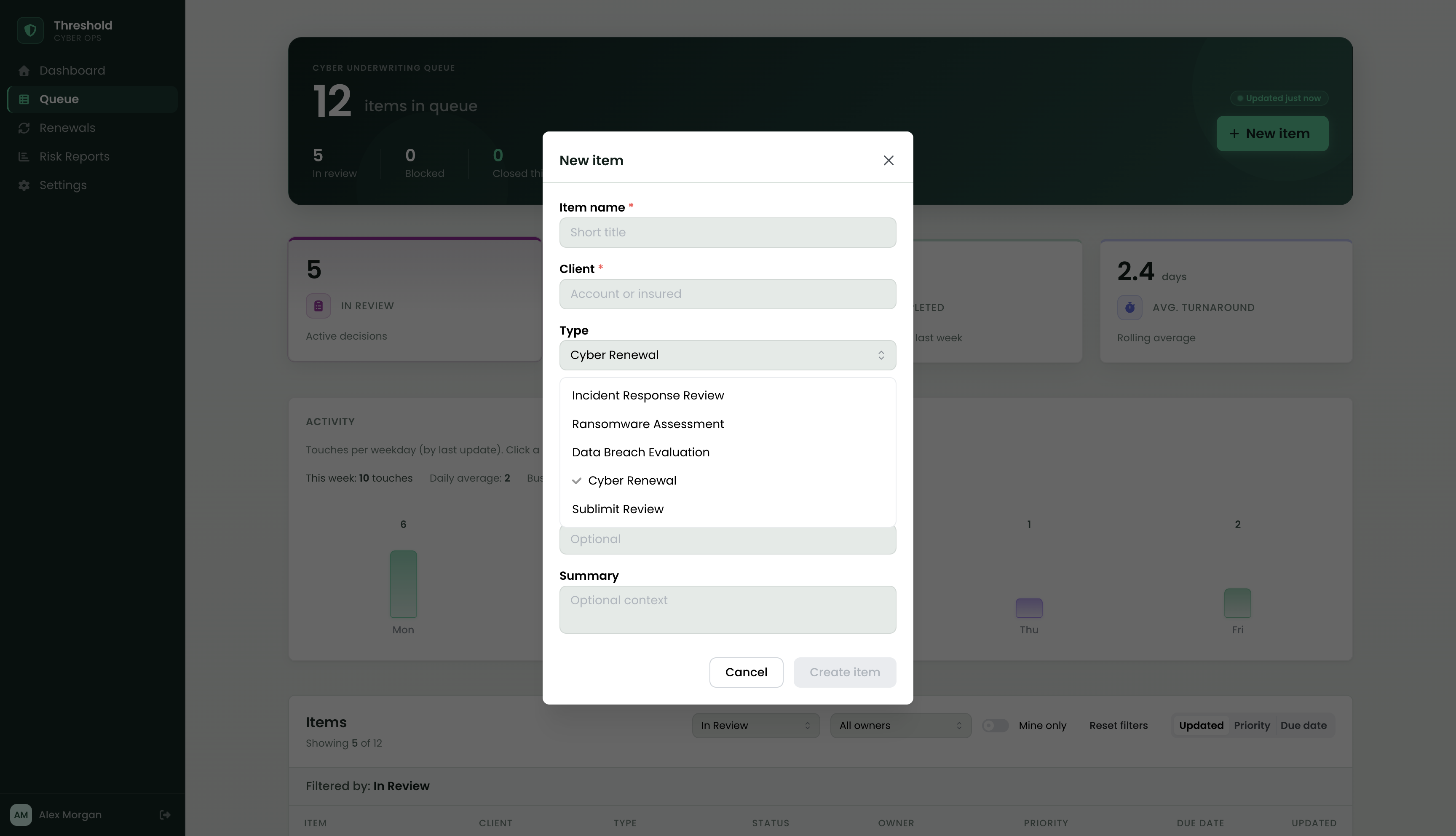
- Lightweight intake — a modal form creates new items with name, client, type, owner, priority, due date, and a summary. Work types are domain-specific: Ransomware Assessment, Data Breach Evaluation, Sublimit Review, Cyber Renewal. The item lands at the top of the table with an activity entry and a flash animation that orients the user to the new row.
- Scripted live updates — every 30 seconds, a queued sequence of real notes and status changes fires against mock items, keeping the demo queue fresh and the "Updated just now" badge honest. No backend needed.
Key features
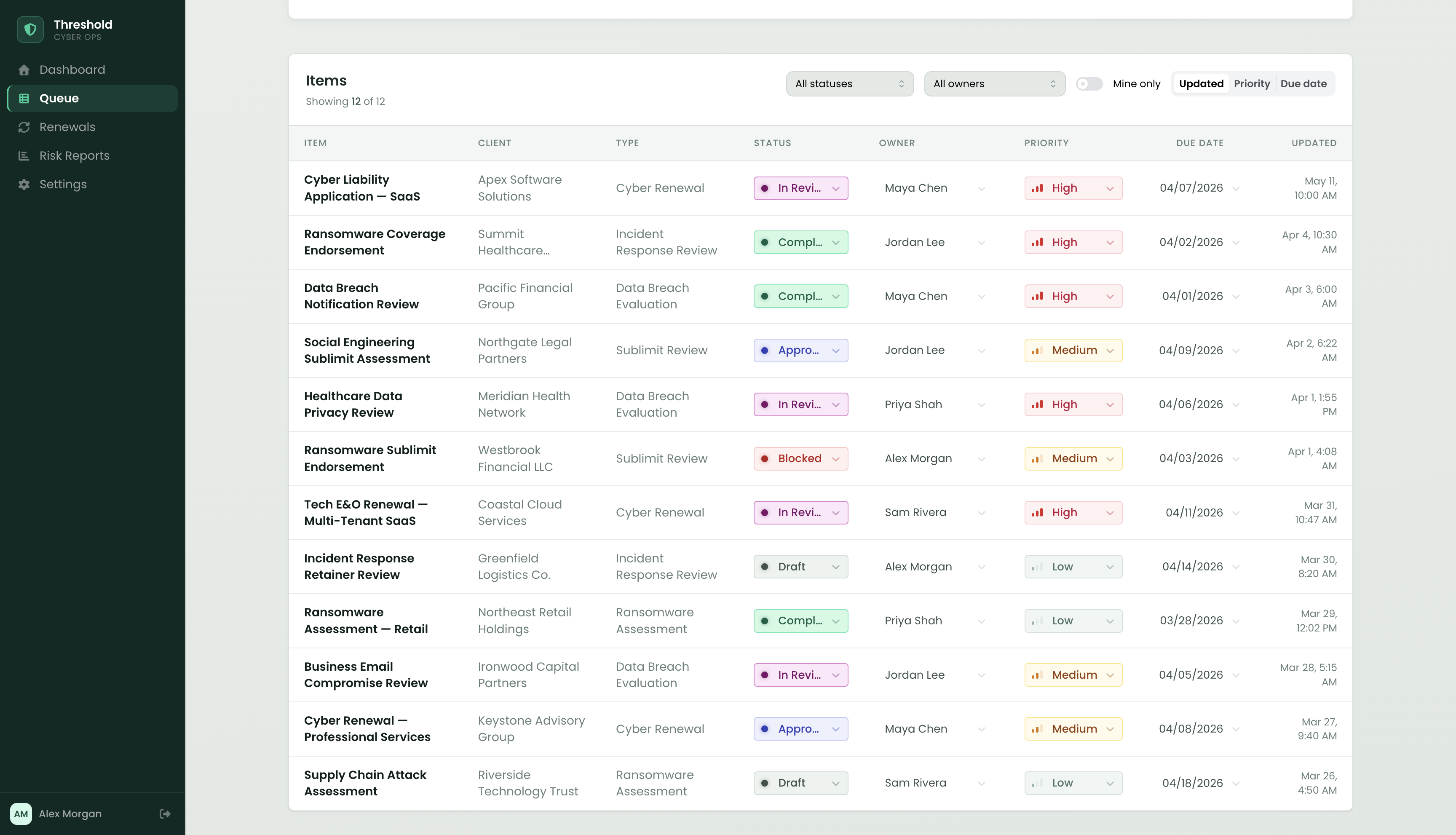
The queue
The full underwriting queue — every active item with owner, priority, type, status, and due date visible without opening anything. Dense enough to see the whole picture; sortable by any column.
Metrics as filters
The stat cards aren't decorative. Clicking "In Review" or "Blocked" scopes the table to those items immediately — the metric earns its place by being functional, not just informational. A unified filter banner shows exactly what's active and clears in one click.
Inline editing
Every field that can change does so in place. Status, owner, priority, and due date all update in the row — no modals, no navigation. The inline field flashes briefly to confirm the write, and the activity log updates in the background.
Detail panel
A focused side panel for context, notes, and history — open alongside the table, not instead of it. Owners can leave notes and change status without losing their place in the queue. Every action is appended to the activity log with a timestamp.
Lightweight intake
New work enters the system quickly, with sensible defaults and domain-specific work types built in. The item lands at the top of the table with its activity entry — no ambiguity about where it went.
Stack
- Next.js 16 (App Router) — single-page app shell with a client-side workspace component managing all item state.
- Mantine — component library for the table, modals, drawers, selects, and form inputs. Theme extended with custom teal-gray design tokens and a dark sidebar shell.
- TypeScript — strict types throughout; domain types (
ItemStatus,Priority,ItemType) flow from a singletypes.ts; runtime type guards on all Select callbacks replace unsafe casts. - Mock data layer — 12 seeded items reflecting real cyber underwriting work: ransomware assessments, HIPAA breach evaluations, BEC wire fraud reviews, SOC-2 renewals, sublimit endorsements. A scripted live-update sequence fires every 30s — real notes and status changes, not badge animation. State resets on refresh by design: this is a demo of the interface, not a persistence layer, and a fresh queue is more useful than stale state for a portfolio demo.
- FontAwesome — icon set for status glyphs, stat cards, priority indicators, and inline controls.
Design decisions
Table over board
Kanban boards work for work that moves linearly through a few stages. Insurance review queues are denser — 50+ items, multiple owners, regulatory deadlines that matter. A table lets you scan, sort, and compare across dimensions a board can't. Progressive disclosure via the detail panel handles depth without polluting the main view.
Metrics as filters
The four stat cards aren't decorative. Clicking "In Review" or "Blocked" filters the table to those items immediately. The metric earns its place by being functional, not just informational — it's a shortcut into the relevant slice of the queue.
Inline editing over modals
Opening a modal to change a status or reassign an owner is friction that compounds across dozens of updates per day. Inline editing keeps the user in the flow of the queue. The flash feedback confirms the write without an explicit toast — the activity log is the record.
Activity log as audit trail
Every status change, ownership move, due date update, and note is appended to the item's activity log with a timestamp. This matters in cyber insurance: "who approved the BEC sublimit adjustment and when" is a real question that gets asked at renewal. The log answers it without digging through email.
Domain-specific intake types
Work types in the intake form aren't generic categories — they're the actual types cyber underwriting teams deal with: Ransomware Assessment, Data Breach Evaluation, Sublimit Review, Cyber Renewal, Incident Response Review. This specificity matters: it means the tool speaks the team's language from the moment work enters the system.
What changed when it got real
- Filter composition surfaced a UX gap. The first version had separate "clear" buttons per filter. Once multiple filters could be active simultaneously, users had no way to see the combined state at a glance. The unified filter banner — which lists every active filter and clears them all in one click — came from watching that confusion play out.
- The table pulse was earned, not added. Without it, filtering felt instant but directionless — results just changed. Adding the CSS pulse class on each filter change gave the update a physical register. It's 200ms of animation but it made the interaction feel substantially more responsive.
- Visual hierarchy beat styling. Early iterations had more decoration — stronger colors, more borders. Stripping back to a cool teal-gray palette with careful elevation let the actual content (status, owner, due date) carry the weight. The data is the design.
- Live ticks forced honest timestamps. The "Updated just now" badge looked great until the mock data went stale 30 seconds after load. The scripted live-update sequence — which fires real notes and status changes on a 30s interval — kept the badge accurate and made the demo feel like a live team queue instead of a screenshot with buttons.
Outcome
- Threshold is a complete, interactive internal tool — not a concept. Every feature is wired: metrics filter the table, inline edits write to the activity log, the detail panel updates live, and the demo queue stays fresh without a backend.
- The domain specificity is intentional. Cyber insurance underwriting teams deal with a specific shape of work: regulated notification deadlines, sublimit endorsements that need CAT sign-off, breach evaluations that require an auditable decision trail. Building for that context — rather than a generic task tracker — produces a tool that understands what a blocked item means and why the activity log matters at renewal time.
- Code lives here: github.com/meganleclair/relay-task-tracker.